[x] Welcome to LinuxSolved.com Linux help forums, here we are a community of Linux users helping each other. It is helpful to both ie. new linux users as well experienced one. We always have our experts to help you and ofcourse members help each other, so you can ask for help any time by Registering.: Click to Register

Welcome, Guest. Please login or register.
Did you miss your activation email?


Login with username, password and session length

Linux Forums - Linux Help,Advice & support community:LinuxSolved.com  |  Forum  |  Linux in General  |  Linux Tutorials & How To's  |  Topic: File Access Control List (ACL) desktop application
The LinuxSolved.com GNU/Linux User Communit - Forum
Welcome to LinuxCommunity You have just arrived to a friendly linux community which is helping Linux Users from Years.. You can be its part if you have not already joined it. Registration is FREE and is gateway to unlimited help and support to all your linux related needs. If you are an GNU/Linux supporter then you have come to the right place.
Pages: [1]
  Print  
Author Topic: File Access Control List (ACL) desktop application  (Read 258 times)
0 Members and 1 Guest are viewing this topic.
pedro
New Member

Offline Offline

Posts: 2


View Profile
« on: March 20, 2008, 03:42:49 PM »


File Access Control List (ACL) permissions have been around for linux for quite some time, but it's one of those very useful features that for unknown reasons nobody talks about. They are an extension to the traditional and very limited unix User-Group-World permissions that allows the user to set access to the file system on a per-user basis. It's very similar to windows NTFS file permissions management.

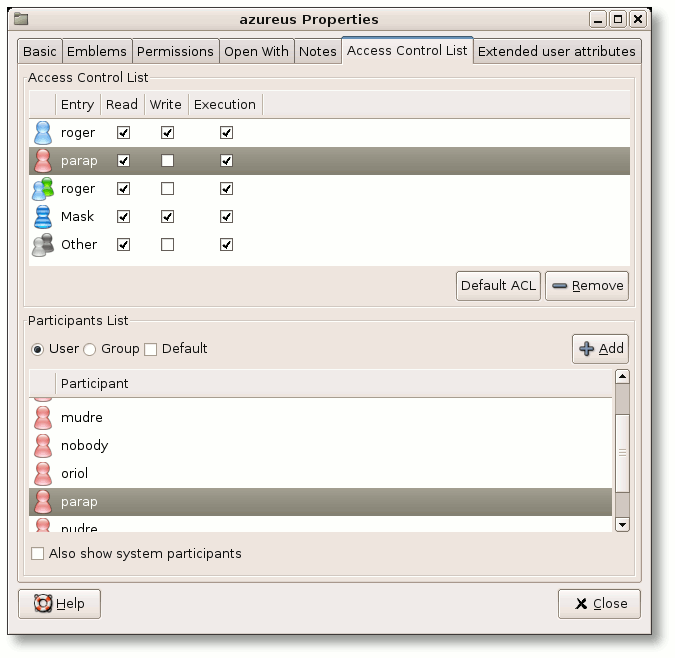
There's a very nice extension for nautilus (gnome file browser) to manage file ACL. The extension is named Eiciel, and you can find it here:
http://rofi.roger-ferrer.org/eiciel/
If you have fedora, you can install it by typing in the command line:
Code:
sudo yum install eiciel

You also need to enable ACL for the partition. To do that you need to edit the /etc/fstab configuration file, and change the appropriate row. Where it says "defaults" should read "rw,acl" for ext2 and ext3 partitions, for example the line:
Code:
/dev/sdb5    /mnt/data     ext3    defaults    1 2
Should become:
Code:
/dev/sdb5    /mnt/data     ext3    rw,acl      1 2

And mount, or remount the partition with:
Code:
sudo mount /mnt/data
to mount it.
Code:
sudo mount -o remount /mnt/data
to remount it, if it was already mounted.

Now, if you right-click->Properties on a folder in that partition, you'll get a new "Access Control List" tab where you can set fine-grained access permissions easily. You can for example allow access to a folder to a single user, and not the rest of the users.



Logged
Linux Forums - Linux Help,Advice & support community:LinuxSolved.com
   

 Logged
Pages: [1]
  Print  
 
Jump to:  

Related Topics
Subject Started by Replies Views Last post
Speed up Application Miscellaneous sanil_linux 3 1259 Last post February 11, 2004, 10:53:30 AM
by dragoncity99
Squid Access control by MAC Address ( mac based ACL ) Linux Servers Support bijusoman 4 1971 Last post October 12, 2004, 04:35:39 AM
by Ricky
How to know which application is installed and which is not Miscellaneous taraj 1 793 Last post August 23, 2004, 09:37:38 AM
by anil_garg5
Open application on specific desktop Miscellaneous sil 0 366 Last post April 10, 2008, 03:28:00 AM
by sil
How to find out whether a file is open or not by any other application/process Linux Development & Programming yogish 0 81 Last post August 13, 2008, 06:15:18 AM
by yogish
Welcome, Guest. Please login or register.
Did you miss your activation email?
August 27, 2008, 08:49:34 PM

Login with username, password and session length
Navigation
Recent Discussions
[August 24, 2008, 05:12:53 AM]

[August 23, 2008, 04:22:52 AM]

[August 23, 2008, 04:18:27 AM]

[August 23, 2008, 04:12:11 AM]

[August 22, 2008, 01:12:07 AM]

[August 20, 2008, 10:20:08 PM]

[August 20, 2008, 07:45:14 AM]

[August 20, 2008, 06:46:01 AM]

[August 20, 2008, 02:34:39 AM]

[August 13, 2008, 06:15:18 AM]
Members
Total Members: 5983
Latest: dhekalemanisha
Stats
Total Posts: 8119
Total Topics: 2189
Online Today: 17
Online Ever: 111
(June 28, 2007, 06:47:29 AM)
Users Online
Users: 0
Guests: 11
Total: 11
Privacy Policy| Powered by SMF 1.1.4 | SMF © 2006-2007, Simple Machines LLC
Seo4Smf v0.2 © Webmaster's Talks
Theme & TinyPortal v0.9.8 © Bloc